STACX Lender API
Welcome to the STACX API. This documentation provides a comprehensive guide to all available endpoints, allowing you to seamlessly integrate our powerful financial tools into your applications.
Purpose
The Client Integration Guide serves as a comprehensive resource for facilitating the seamless integration of ATL products with client applications through the AVANZE API. It equips users with essential information
necessary for the successful receipt of orders and the submission of products upon order completion.
This document is authored, updated, and disseminated by Avanze Tech Labs Inc. (“ATL”) with the primary objective of conveying implementation requisites to our valued clients and ATL product. ATL stands behind the
accuracy and relevance of the content provided within this Client Implementation Guide, ensuring alignment with our integration standards.
Client ID
The following Client IDs are designated for use when sending order requests and handling other respective events. It is important for clients to ensure that all Client IDs are correctly configured within their respective environments.
| Environment | Client ID | Client Name |
|---|---|---|
| UAT | ATLUAT | Will be provided during UAT |
| PROD | ATLPROD | Will be provided during PROD |
Products
Through the Avanze API, clients have the capability to place orders for a variety of products. The product listing provided below contains all potential products that AvanzeAPI can deliver through the client platform. However, it is essential for clients to reference their individual subscription agreements with ATL and configure the products relevant to their specific implementation.
| Product Code | Product Name |
|---|---|
| 8 | Post Closing |
| 9 | Loan Modification |
| 10 | CD |
Connectivity Detail
Through the Avanze API, clients have the capability to place orders for a variety of products. The product listing provided below contains all potential products that AvanzeAPI can deliver through the client platform. However, it is essential for clients to reference their individual subscription agreements with ATL and configure the products relevant to their specific implementation.
- Secure Communication: HTTPS ensures secure communication by encrypting data during transmission, preventing any unauthorized access during transit.
- Data Transmission: With the POST method, you're sending data from the client application to the API endpoint. This data could be in various formats such as JSON, XML, or form data, tailored to the API's requirements.
- Endpoint Interaction: The API endpoint is a specific URL provided by the API service that defines where the POST request should be sent. This endpoint typically represents a particular functionality or resource provided by the API.
- Payload: Enclosed within the request body, the payload contains essential information important for the API to execute the desired operation. This may involve creating a new resource, updating existing data, or retrieving information.
- Authentication: Accessing the API endpoint securely mandates authentication of the requests. This involves providing credentials, such as an API key or access token, within the request headers to substantiate the identity and authorization.
- Response Handling: Upon sending the POST request to the API endpoint, a response is returned from the server. This response contains various information, including success or error status codes, along with any data generated by the API in response to the query.
- Error Handling: When the API encounters difficulties processing requests, it will typically return an appropriate error status code and potentially additional error details in the response body. As a result, the client application must proficiently handle these scenarios and respond accordingly.
In summary, employing the HTTPS POST method to interface with an API facilitates secure and dependable communication between the client application and the API service. This capability empowers applications to seamlessly interact with and harness the full functionality offered by the API. Integration clients may also choose to develop an HTTPS Receiver of their own, in which they would receive via HTTPS Post.
| Environment | URL |
|---|---|
| UAT |
https://stage.avanzeapi.com/{modulename}/{orgcode}
|
| PROD |
https://avanzeapi.com/{modulename}/{orgcode}
|
Authorization
Instead of sending credentials in plain text through post parameters, an authenticated request includes the Authorization Header Variable. If this header is not included, the request is anonymous and may not succeed against API services.
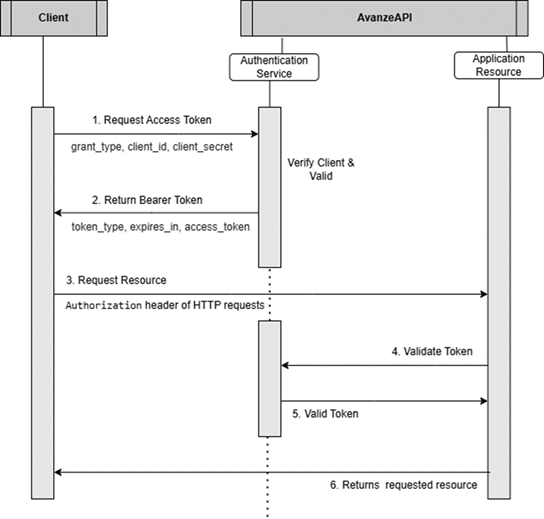
1. Oauth Authentication
i. Oauth Token Generation
To obtain an authentication token, the client must submit valid credentials to the authentication service.
-
Upon successful authentication, a
Bearer Tokenis issued with a predefined expiration period. -
This token must be included in the
Authorizationheader of all subsequent API requests.
| Name | Type | Required | Description |
|---|---|---|---|
grant_type
|
string
|
Yes | client_credentials |
client_id
|
string
|
Yes |
{{your_client_id}}
|
client_secret
|
string
|
Yes |
{{your_client_secret}}
|
scope
|
string
|
Yes |
{{your_scope}}
|
ii. Using the Bearer Token in API Requests
Once the token is received, it must be included in the HTTP Authorization header of all API calls
| Name | Type | Required | Description |
|---|---|---|---|
Authorization
|
string
|
Yes |
access_token
received from Oauth request
|
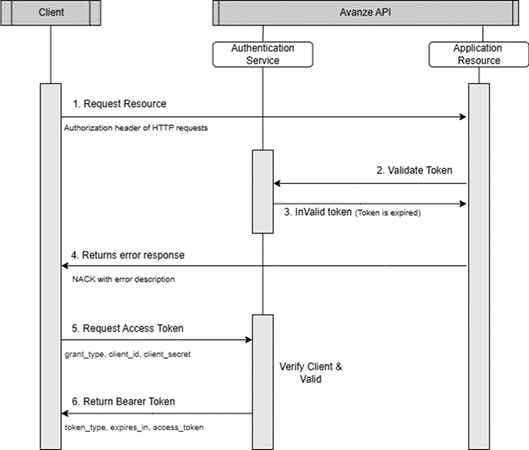
iii. Token Expiry & Renewal
- The issued token has a fixed expiration time (e.g., 1 hour).
- If a request is made with an expired token, the API responds with an error (NACK).
- The client must request a new token from the authentication service before making further API calls.
iv. Error Handling
If an invalid or expired token is used, the API will return the following response.
Error response:
{
  "Header": {
   "Created":"2025-02-13T01:01:56-05:00",
   "SourceApp":"MAX",
   "SourceVer":"2.0",
   "SourceEnv":"UAT",
   "Status":"NACK"
 },
 "Transaction": {
   "TransactionID":"",
   "Errors":{
   "Type":"UnauthorizedAccessException",
   "Description":"Not Authorized."
   }
 }
}
v. Implementation Diagram
a. Token Request Process
b. API Request with Expired or Missing Token
Constructing Basic Authentication
Constructing Basic Authentication through headers involves encoding the username and password in a specific format and including them in the HTTPs request headers.
Encode Credentials: Combine the username and password with a colon (:) separator, then base64 encodes the resulting string. The format is username:password.
Include in Header: Set the Authorization header of the HTTP request to the value "Basic” followed by the base64 encoded credentials. The final header value should look like "Basic {{base64_encoded_credentials}}."
| Name | Type | Required | Description |
|---|---|---|---|
Authorization
|
string
|
Yes |
{{base64_encoded_credentials}}
base64 encoded username and password
|
API Events
| Event Code | Event Name | Event Originator | Client Sending | Client Receiving | Event Definition |
|---|---|---|---|---|---|
| AT11 | PlaceOrder | Client |
R*
|
CLIENT sends this event to initiate an order request to AVANZE API. | |
| AT12 | AcceptOrder | Avanze API | R |
AVANZE API sends this event to CLIENT to inform that STACX / MAX accepts the order request. | |
| AT13 | RejectOrder | Avanze API | R |
AVANZE API sends this event to CLIENT with the order documents and product data. | |
| AT14 | ProductDelivery | Avanze API | R* |
AVANZE API sends this event to CLIENT with the order documents and product data. | |
| AT15 | AddNotes | Both |
O
|
O |
CLIENT and/or AVANZE API send this event to provide a note on an order request. |
| AT21 | HoldOrder | Both |
O
|
O |
CLIENT and/or AVANZE API send this event to place the order request on hold. |
| AT22 | CancelOrder | Both |
O
|
O |
CLIENT and/or AVANZE API send this event to cancel the order request. |
| AT23 | ResumeOrder | Both |
O
|
O |
CLIENT or AVANZE API sends this event to resume a service order request that has been cancelled or put on hold. |
| AT25 | AddDocument | Both |
O
|
O |
CLIENT or AVANZE API sends this event to attach documents to the order. |
| AT30 | GetStatus | Client |
O
|
The CLIENT sends this event to the AVANZE API to get the status of the order. | |
| AT31 | OrderStatus | Avanze API | R |
The AVANZE API sends this event to the CLIENT to notify you of the status of the order. | |
| AT34 | GetPayloadData | Avanze API | R |
The AVANZE API sends this event to the CLIENT to request payload data of the order. | |
| AT35 | UpdateOrderStatus | Both | CLIENT and/or AVANZE API send this event to update the order status and documents data. | ||
| AT36 | PayloadData | Client |
O
|
The Client sends this event to provide payload data. | |
| AT45 | ClientFeedback | Client |
O
|
The CLIENT sends this event for feedback. | |
| AT46 | OrderException | Client |
O
|
The Client sends this event to STACX to clear the exceptions raised. | |
| AT50 | OrderComplete | Client |
O
|
The CLIENT sends this event to notify AVANZE API that the order request is completed. | |
| AT60 | NewDocType | Client |
O
|
The Client sends this event to the STACX/MAX to add a new Document Type for Classification. | |
| AT65 | ClassificationFB | Client |
O
|
The Client sends this event to the STACX/MAX to provide feedback on Document Type Classification. | |
| AT70 | ExtractionFB | Client |
O
|
The Client sends this event to STACX/MAX to provide feedback on Extraction Fields. | |
| AT76 | UpdateDocumentField | Client |
O
|
The Client sends this event to the STACX/MAX to Update the document field names. |
Workflow Diagram
A typical standard workflow process that clients commonly demand from their STACX/MAX instance encompasses the entire product ordering and order completion process.
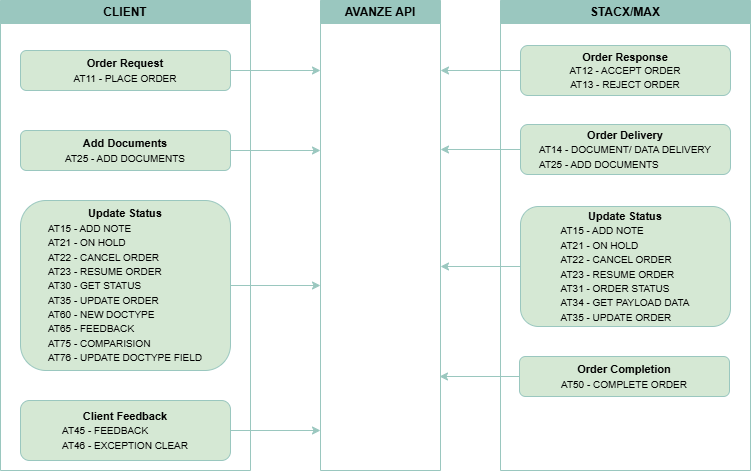
Flow Diagram
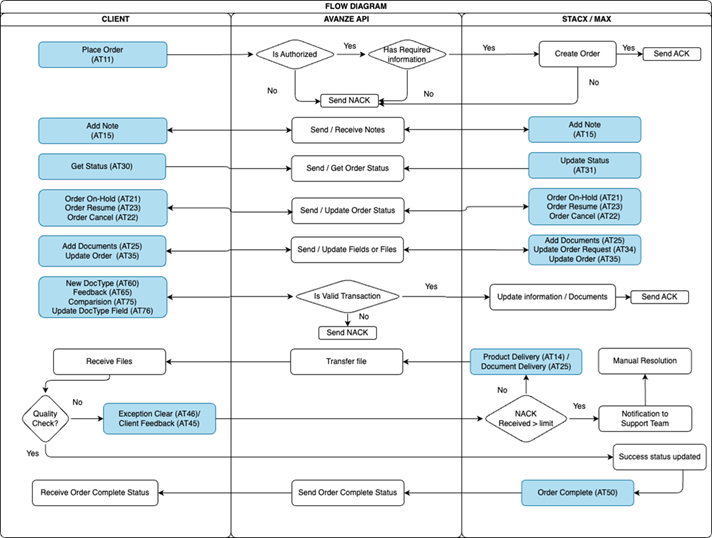
Event Definition
Order Placement:
- CLIENT will create the Order Requests (CLIENT API Event AT11). CLIENT API will route the orders to STACX / MAX.
Confirmation of the orders:
- STACX / MAX will confirm the request (CLIENT API Event AT12) for the order.
- If STACX / MAX does not accept the order, MAX will decline the order by sending Order Not Accepted by STACX / MAX (CLIENT API Event AT13) on the order.
Order Process:
- The STACX / MAX and/or CLIENT may send the documents to the order by the event (CLIENTAPI Event AT25) event.
- When the order is complete, STACX / MAX will upload the documents using Document Delivered by STACX / MAX with product data (CLIENT API Event AT14).
Quality Check:
After receiving the (CLIENT API Event AT14), CLIENT with do quality check for every order
- If Quality check is passed, then CLIENT will send (CLIENT API Event AT50) to STACX / MAX.
- If QC fails, then Client sends AT45 (CLIENT API Event AT45) to STACX / MAX Which will move the order into Client feedback queue and then after correction the STACX / MAX will send the (CLIENT API Event AT14) back to CLIENT.
Completion of Order:
- CLIENT will send Order Completed (CLIENT API Event AT50) to STACX / MAX to indicate the order is completed.
General Use Events:
- STACX / MAX should post any notes or events to CLIENT by sending Notes (CLIENT API Event AT15) on the applicable order. Notes (CLIENT API Event AT15) will also be utilized by the CLIENT in the applicable order to relay information to CLIENT.
- The STACX / MAX and/or CLIENT may communicate that the order is on hold by sending Order On-Hold (CLIENTAPI Event AT21) event. The Order Resume (CLIENTAPI Event AT23) is sent to resume an order that has been put on hold (CLIENT API Event AT21).
- The Client sends this event to the STACX / MAX to get the status of the order (CLIENT API Event AT30) event.
- The STACX / MAX or Client sends this event to notify the order status and documents data of the order (CLIENT API Event AT35) event.
AT11 - Place Order
CLIENT sends this event to initiate an order request to AVANZE API.
CLIENT sends this event to initiate an order request to STACX.
| Name | Type | Required | Description |
|---|---|---|---|
| Header | |||
Created
|
date time
|
Yes | Request date time (2021-06-10T14:18:42+00:00 (W3C)) |
SourceApp
|
string
|
Yes | Name of Source application |
SourceVer
|
string
|
Yes | Application Version |
SourceEnv
|
string
|
Yes | Source application environment. Eg: UAT/DEV/PROD |
ClientID
|
string
|
Yes | ClientID (mentioned under purpose section) |
EventCode
|
string
|
Yes | Requested Event Code. Eg: AT11 |
EventName
|
string
|
Yes | Name of the event. Eg: PlaceOrder |
CorrelationIdentifier
|
string
|
Yes | Unique 32-bit random Hash for the event |
| Transaction | |||
TransactionID
|
string
|
Yes | Order number of the client application |
| Transaction > LoanInfo | |||
LoanNumber
|
string
|
Yes | Loan Number |
ProductCode
|
string
|
Yes | ProductCode is mentioned in Product Section |
| Transaction > LoanInfo > Property | |||
Address1
|
string
|
Yes | Property address |
Address2
|
string
|
Yes | Property address |
State
|
string
|
Yes | Property statecode |
County
|
string
|
Yes | Property county |
City
|
string
|
Yes | Property city |
Zip
|
string
|
Yes | Property zipcode |
| Transaction > DocumentsList | |||
Count
|
number
|
Yes | No of documents count |
| Transaction > DocumentsList > Documents > Document | |||
FileName
|
string
|
Yes | Name of the document |
FileType
|
string
|
Yes | Document type. Eg: PDF |
FileSource
|
string
|
Yes | File Source Eg: Base64/S3/SFTP/LINK |
File
|
string
|
Yes | File Content / File Path |
| Comments |
string
|
Yes | Comments |
AT12 - Accept Order
STACX sends this event to CLIENT to inform that STACX accepts the order request.
CLIENT sends this event to initiate an order request to STACX.
| Name | Type | Required | Description |
|---|---|---|---|
| Header | |||
Created
|
date time
|
Yes | Request date time (2021-06-10T14:18:42+00:00 (W3C)) |
SourceApp
|
string
|
Yes | Name of Source application |
SourceVer
|
string
|
Yes | Application Version |
SourceEnv
|
string
|
Yes | Source application environment. Eg: UAT/DEV/PROD |
ClientID
|
string
|
Yes | ClientID (mentioned under purpose section) |
EventCode
|
string
|
Yes | Requested Event Code. Eg: AT12 |
EventName
|
string
|
Yes | Name of the event. Eg: AcceptOrder |
CorrelationIdentifier
|
string
|
Yes | Unique 32-bit random Hash for the event |
| Transaction | |||
TransactionID
|
string
|
Yes | Order number of the client application |
| Transaction > Comments |
string
|
Yes | Comments |
AT13 - Reject Order
STACX sends this event to CLIENT to inform that the STACX does not accept the order request.
CLIENT sends this event to initiate an order request to STACX.
| Name | Type | Required | Description |
|---|---|---|---|
| Header | |||
Created
|
date time
|
Yes | Request date time (2021-06-10T14:18:42+00:00 (W3C)) |
SourceApp
|
string
|
Yes | Name of Source application |
SourceVer
|
string
|
Yes | Application Version |
SourceEnv
|
string
|
Yes | Source application environment. Eg: UAT/DEV/PROD |
ClientID
|
string
|
Yes | ClientID (mentioned under purpose section) |
EventCode
|
string
|
Yes | Requested Event Code. Eg: AT13 |
EventName
|
string
|
Yes | Name of the event. Eg: RejectOrder |
CorrelationIdentifier
|
string
|
Yes | Unique 32-bit random Hash for the event |
| Transaction | |||
TransactionID
|
string
|
Yes | Order number of the client application |
| Transaction > Comments |
string
|
Yes | Comments |
AT14 - Product Delivery
STACX sends this event to CLIENT with the order documents and product data.
CLIENT sends this event to initiate an order request to STACX.
| Name | Type | Required | Description |
|---|---|---|---|
| Header | |||
Created
|
date time
|
Yes | Request date time (2021-06-10T14:18:42+00:00 (W3C)) |
SourceApp
|
string
|
Yes | Name of Source application |
SourceVer
|
string
|
Yes | Application Version |
SourceEnv
|
string
|
Yes | Source application environment. Eg: UAT/DEV/PROD |
ClientID
|
string
|
Yes | ClientID (mentioned under purpose section) |
EventCode
|
string
|
Yes | Requested Event Code. Eg: AT14 |
EventName
|
string
|
Yes | Name of the event. Eg: Product Delivery |
CorrelationIdentifier
|
string
|
Yes | Unique 32-bit random Hash for the event |
| Transaction | |||
TransactionID
|
string
|
Yes | Order number of the client application |
OrderNumber
|
string
|
Yes | Order number of the STACX application |
| Transaction > ClassificationData > Page | |||
PageNum
|
string
|
Yes | Page Number Eg :1 |
DocType
|
string
|
Yes | DocType Eg : Credit Report |
PageConfidence
|
string
|
Yes | Page Confidence Eg : 78 |
| Transaction > DocumentsList | |||
Count
|
number
|
Yes | Page Confidence Eg : 78 |
| Transaction > DocumentsList > Documents > Document | |||
FileName
|
string
|
Yes | Name of the document |
Type
|
string
|
Yes | Type Eg: Credit Report |
Pages
|
string
|
Yes | Pages Eg: 4 |
FileType
|
string
|
Yes | Type of the document. Eg. PDF |
FileSize
|
string
|
Yes | Document size. |
FileSource
|
string
|
Yes | File Source Eg: Base64/S3/SFTP/LINK |
File
|
string
|
Yes | File Content / File Path |
Attribute
|
string
|
Yes | Attributes |
| Transaction > DocumentsList > Documents > Document > Attribute | |||
Name
|
string
|
Yes | Name Eg : Version,Borrower_First_Name |
Value
|
string
|
Yes | Value Eg : 1.0,John |
Page
|
string
|
number | Page number. Eg : 1 |
| Transaction > Reports | |||
FileName
|
string
|
Yes | File Name. Eg:AuditCheckList.pdf |
FileType
|
string
|
Yes | Document type. Eg: PDF |
FileSource
|
string
|
Yes | File Source Eg: Base64 |
Type
|
string
|
Yes | Type Eg: AuditChecklist |
File
|
string
|
Yes | File Content |
| Transaction > Comments |
string
|
Yes | Comments |
AT15 - Add Notes
CLIENT and/or STACX send this event to provide a note on an order request.
CLIENT sends this event to initiate an order request to STACX.
| Name | Type | Required | Description |
|---|---|---|---|
| Header | |||
Created
|
date time
|
Yes | Request date time (2021-06-10T14:18:42+00:00 (W3C)) |
SourceApp
|
string
|
Yes | Name of Source application |
SourceVer
|
string
|
Yes | Application Version |
SourceEnv
|
string
|
Yes | Source application environment. Eg: UAT/DEV/PROD |
ClientID
|
string
|
Yes | ClientID (mentioned under purpose section) |
EventCode
|
string
|
Yes | Requested Event Code. Eg: AT11 |
EventName
|
string
|
Yes | Name of the event. Eg: PlaceOrder |
CorrelationIdentifier
|
string
|
Yes | Unique 32-bit random Hash for the event |
| Transaction | |||
TransactionID
|
string
|
Yes | Order number of the client application |
OrderNumber
|
string
|
Yes | Order Number |
Comments
|
string
|
Yes | Comments |
AT21 - Hold Order
CLIENT and/or STACX send this event to place the order request on hold.
CLIENT sends this event to initiate an order request to STACX.
| Name | Type | Required | Description |
|---|---|---|---|
| Header | |||
Created
|
date time
|
Yes | Request date time (2021-06-10T14:18:42+00:00 (W3C)) |
SourceApp
|
string
|
Yes | Name of Source application |
SourceVer
|
string
|
Yes | Application Version |
SourceEnv
|
string
|
Yes | Source application environment. Eg: UAT/DEV/PROD |
ClientID
|
string
|
Yes | ClientID (mentioned under purpose section) |
EventCode
|
string
|
Yes | Requested Event Code. Eg: AT11 |
EventName
|
string
|
Yes | Name of the event. Eg: PlaceOrder |
CorrelationIdentifier
|
string
|
Yes | Unique 32-bit random Hash for the event |
| Transaction | |||
TransactionID
|
string
|
Yes | Order number of the client application |
OrderNumber
|
string
|
Yes | Order Number |
Comments
|
string
|
Yes | Comments |
AT22 - Cancel Order
CLIENT and/or AVANZE API send this event to cancel the order request.
CLIENT sends this event to initiate an order request to STACX.
| Name | Type | Required | Description |
|---|---|---|---|
| Header | |||
Created
|
date time
|
Yes | Request date time (2021-06-10T14:18:42+00:00 (W3C)) |
SourceApp
|
string
|
Yes | Name of Source application |
SourceVer
|
string
|
Yes | Application Version |
SourceEnv
|
string
|
Yes | Source application environment. Eg: UAT/DEV/PROD |
ClientID
|
string
|
Yes | ClientID (mentioned under purpose section) |
EventCode
|
string
|
Yes | Requested Event Code. Eg: AT22 |
EventName
|
string
|
Yes | Name of the event. Eg: Cancel Order |
CorrelationIdentifier
|
string
|
Yes | Unique 32-bit random Hash for the event |
| Transaction | |||
TransactionID
|
string
|
Yes | Order number of the client application |
OrderNumber
|
string
|
Yes | Order Number |
Comments
|
string
|
Yes | Comments |
AT23 - Resume Order
CLIENT or AVANZE API sends this event to resume a service order request that has been cancelled or put on hold.
| Name | Type | Required | Description |
|---|---|---|---|
| Header | |||
Created
|
date time
|
Yes | Request date time (2021-06-10T14:18:42+00:00 (W3C)) |
SourceApp
|
string
|
Yes | Name of Source application |
SourceVer
|
string
|
Yes | Application Version |
SourceEnv
|
string
|
Yes | Source application environment. Eg: UAT/DEV/PROD |
ClientID
|
string
|
Yes | ClientID (mentioned under purpose section) |
EventCode
|
string
|
Yes | Requested Event Code. Eg: AT23 |
EventName
|
string
|
Yes | Name of the event. Eg: Resume Order |
CorrelationIdentifier
|
string
|
Yes | Unique 32-bit random Hash for the event |
| Transaction | |||
TransactionID
|
string
|
Yes | Order number of the client application |
OrderNumber
|
string
|
Yes | Order Number |
Comments
|
string
|
Yes | Comments |
AT25 - Add Document
CLIENT or AVANZE API sends this event to attach documents to the order.
| Name | Type | Required | Description |
|---|---|---|---|
| Header | |||
Created
|
date time
|
Yes | Request date time (2021-06-10T14:18:42+00:00 (W3C)) |
SourceApp
|
string
|
Yes | Name of Source application |
SourceVer
|
string
|
Yes | Application Version |
SourceEnv
|
string
|
Yes | Source application environment. Eg: UAT/DEV/PROD |
ClientID
|
string
|
Yes | ClientID (mentioned under purpose section) |
EventCode
|
string
|
Yes | Requested Event Code. Eg: AT23 |
EventName
|
string
|
Yes | Name of the event. Eg: Resume Order |
CorrelationIdentifier
|
string
|
Yes | Unique 32-bit random Hash for the event |
| Transaction | |||
TransactionID
|
string
|
Yes | Order number of the client application |
OrderNumber
|
string
|
Yes | Order Number |
Comments
|
string
|
Yes | Comments |
| Transaction > Documents List > Document | |||
FileName
|
string
|
Yes | File Name of the Sample Template provided |
FileType
|
string
|
Yes | Document type. Eg: PDF |
FileSource
|
string
|
Yes | File Source Eg: Base64 |
File
|
string
|
Yes | File Content |
AT30 - Get Status
The CLIENT sends this event to the AVANZE API to get the status of the order.
| Name | Type | Required | Description |
|---|---|---|---|
| Header | |||
Created
|
date time
|
Yes | Request date time (2021-06-10T14:18:42+00:00 (W3C)) |
SourceApp
|
string
|
Yes | Name of Source application |
SourceVer
|
string
|
Yes | Application Version |
SourceEnv
|
string
|
Yes | Source application environment. Eg: UAT/DEV/PROD |
ClientID
|
string
|
Yes | ClientID (mentioned under purpose section) |
EventCode
|
string
|
Yes | Requested Event Code. Eg: AT23 |
EventName
|
string
|
Yes | Name of the event. Eg: Resume Order |
CorrelationIdentifier
|
string
|
Yes | Unique 32-bit random Hash for the event |
| Transaction | |||
TransactionID
|
string
|
Yes | Order number of the client application |
OrderStatus
|
string
|
Yes | Current status of the order |
AT31 - Order Status
The AVANZE API sends this event to the CLIENT to notify you of the status of the order.
| Name | Type | Required | Description |
|---|---|---|---|
| Header | |||
Created
|
date time
|
Yes | Request date time (2021-06-10T14:18:42+00:00 (W3C)) |
SourceApp
|
string
|
Yes | Name of Source application |
SourceVer
|
string
|
Yes | Application Version |
SourceEnv
|
string
|
Yes | Source application environment. Eg: UAT/DEV/PROD |
ClientID
|
string
|
Yes | ClientID (mentioned under purpose section) |
EventCode
|
string
|
Yes | Requested Event Code. Eg: AT31 |
EventName
|
string
|
Yes | Name of the event. Eg: OrderStatus |
CorrelationIdentifier
|
string
|
Yes | Unique 32-bit random Hash for the event |
| Transaction | |||
TransactionID
|
string
|
Yes | Order number of the client application |
OrderNumber
|
string
|
Yes | Order Number |
OrderStatus
|
string
|
Yes | Current status of the order |
Comments
|
string
|
Yes | Comments |
AT35 - Get Payload Data
CLIENT and/or AVANZE API send this event to update the order status and documents data.
| Name | Type | Required | Description |
|---|---|---|---|
| Header | |||
Created
|
date time
|
Yes | Request date time (2021-06-10T14:18:42+00:00 (W3C)) |
SourceApp
|
string
|
Yes | Name of Source application |
SourceVer
|
string
|
Yes | Application Version |
SourceEnv
|
string
|
Yes | Source application environment. Eg: UAT/DEV/PROD |
ClientID
|
string
|
Yes | ClientID (mentioned under purpose section) |
EventCode
|
string
|
Yes | Requested Event Code. Eg: AT35 |
EventName
|
string
|
Yes | Name of the event. Eg: OrderStatus |
CorrelationIdentifier
|
string
|
Yes | Unique 32-bit random Hash for the event |
| Transaction | |||
TransactionID
|
string
|
Yes | Order number of the client application |
OrderNumber
|
string
|
Yes | Order Number |
Comments
|
string
|
Yes | Comments |
AT46 - Order Exception
The Client sends this event to the STACX to clear the exception raised.
| Name | Type | Required | Description |
|---|---|---|---|
| Header | |||
Created
|
date time
|
Yes | Request date time (2021-06-10T14:18:42+00:00 (W3C)) |
SourceApp
|
string
|
Yes | Name of Source application |
SourceVer
|
string
|
Yes | Application Version |
SourceEnv
|
string
|
Yes | Source application environment. Eg: UAT/DEV/PROD |
ClientID
|
string
|
Yes | ClientID (mentioned under purpose section) |
EventCode
|
string
|
Yes | Requested Event Code. Eg: AT46 |
EventName
|
string
|
Yes | Name of the event. Eg: Order Exception |
CorrelationIdentifier
|
string
|
Yes | Unique 32-bit random Hash for the event |
| Transaction | |||
TransactionID
|
string
|
Yes | Order number of the client application |
OrderNumber
|
string
|
Yes | Order Number |
Comments
|
string
|
Yes | Comments |
| Transaction > Exceptions | |||
ExceptionID
|
string
|
Yes | ExceptionID |
ExceptionStatus
|
string
|
Yes | Exception Status |
ExceptionCategory
|
string
|
Yes | Exception Category |
DocumentType
|
string
|
Yes | Document Type |
ExceptionType
|
string
|
Yes | Exception Type |
| Transaction > Exceptions > QuestionAnswer | |||
Question
|
string
|
Yes | Question |
Answer
|
string
|
Yes | Answer |
IsCritical
|
string
|
Yes | IsCritical |
Comments
|
string
|
Yes | Comments |
| Transaction > Exceptions > Document | |||
FileName
|
string
|
Yes | File Name of the Sample Template provided |
FileType
|
string
|
Yes | Document type. Eg: PDF |
FileSource
|
string
|
Yes | File Source Eg: Base64 |
File
|
string
|
Yes | File content |
AT50 - OrderComplete
The CLIENT sends this event to notify AVANZE API that the order request is completed.
| Name | Type | Required | Description |
|---|---|---|---|
| Header | |||
Created
|
date time
|
Yes | Request date time (2021-06-10T14:18:42+00:00 (W3C)) |
SourceApp
|
string
|
Yes | Name of Source application |
SourceVer
|
string
|
Yes | Application Version |
SourceEnv
|
string
|
Yes | Source application environment. Eg: UAT/DEV/PROD |
ClientID
|
string
|
Yes | ClientID (mentioned under purpose section) |
EventCode
|
string
|
Yes | Requested Event Code. Eg: AT45 |
EventName
|
string
|
Yes | Name of the event. Eg: ClientFeedback |
CorrelationIdentifier
|
string
|
Yes | Unique 32-bit random Hash for the event |
| Transaction | |||
TransactionID
|
string
|
Yes | Order number of the client application |
OrderNumber
|
string
|
Yes | Order Number |
Comments
|
string
|
Yes | Comments |
ACK Acknowledgement
The Avanze API / Client sends this event on success.
| Name | Type | Required | Description |
|---|---|---|---|
| Header | |||
Created
|
date time
|
Yes | Request date time (2021-06-10T14:18:42+00:00 (W3C)) |
SourceApp
|
string
|
Yes | Name of Source application |
SourceVer
|
string
|
Yes | Application Version |
SourceEnv
|
string
|
Yes | Source application environment. Eg: UAT/DEV/PROD |
ClientID
|
string
|
Yes | ClientID (mentioned under purpose section) |
EventCode
|
string
|
Yes | Requested Event Code. Eg: AT46 |
EventName
|
string
|
Yes | Name of the event. Eg: Order Exception |
CorrelationIdentifier
|
string
|
Yes | Unique 32-bit random Hash for the event |
| Transaction | |||
TransactionID
|
string
|
Yes | Order number of the client application |
OrderNumber
|
string
|
Yes | Order Number |
NACK Acknowledgement
The Avanze API / Client sends this event on failure.
| Name | Type | Required | Description |
|---|---|---|---|
| Header | |||
Created
|
date time
|
Yes | Request date time (2021-06-10T14:18:42+00:00 (W3C)) |
SourceApp
|
string
|
Yes | Name of Source application |
SourceVer
|
string
|
Yes | Application Version |
SourceEnv
|
string
|
Yes | Source application environment. Eg: UAT/DEV/PROD |
ClientID
|
string
|
Yes | ClientID (mentioned under purpose section) |
EventCode
|
string
|
Yes | Requested Event Code. Eg: AT46 |
EventName
|
string
|
Yes | Name of the event. Eg: Order Exception |
CorrelationIdentifier
|
string
|
Yes | Unique 32-bit random Hash for the event |
| Transaction | |||
TransactionID
|
string
|
Yes | Order number of the client application |
OrderNumber
|
string
|
Yes | Order Number |